Showing posts with label Eclipse IDE. Show all posts

Sunday, March 28, 2010

Eclipse setup notes: R (StatEt) and Python (Sage)

My standard Eclipse setup consists of the following extensions:
  • Texclipse
  • StatEt (for R and Sweave)
  • Pydev
  • Data Tools
  • BIRT
And I also have these loaded, even if I don't use them as much
  • CDT (C/C++ Developers tools)
  • Java (since it comes with)
  • Subversion
For a while I've been using StatEt using the R console, because I had not gotten the RJava console to work. While it works, it has two problems (1) it does not open a graphics display, so you could not see the plots you were making (But plots are still generated and included into Sweave documents) and (2) it would drop out if there were any errors in the R code, causing you to have to start over.

The trick with getting RJava to work is set the configuration in the JRE tab in eclipse. In the VM Arguments, there should be an option included that points to rJava (which you have installed and run
sudo R CMD javareconf
to enable)

-Drjava.path=/path.to/rJava

(where the /path.to/ is your path to the location you installed your rJava library in the R directory. On my system it is /home/my_account/R/i486-pc-linux-gnu-library/2.9/ )

This provides a stable interactive R console and allows Sweave.

For Python, in addition to the standard interpreters (python, jython, ipy), you can run Sage. This would be through using the Python interpreter that is in the Sage package.

So add another Python interprester pointing to /sage-4.x.x/bin/python
With $SAGE_ROOT = /path/to/sage-4.x.x
and LD_LIBRARY_PATH = $SAGE_ROOT/local/lib

Next steps, figure out how to add R libraries to the R included in Sage, so R packages can be called from within Sage (note that R can be called using the rpy2 package, but this is only the currently installed packages.)

Friday, August 22, 2008

Importing spreadsheet data into Derby/JavaDB

Adding spreadsheet data to Apache Derby


I have a number of Spreadsheets with data in them, and the trick is to get them into a database so I can make some sense out of them (or be able to tell that they do not make sense, as the case may be). And I figured this would be a decent time to work on a new database. I could have used SQLite that I've used in the past. But I decided to use a server-class database, just because I've never used one. So I choose Derby (because I can still use it as if it were a single-site database). Also, there is some sensitive data, so I needed to password protect it.

Import CSV files

Creating CSV files
The first trick is always getting the data into the database. I opened up the spreadsheet in OpenOffice.org, then copied the row names to text file. That text file turned into a CREATE TABLE statement. The first problem was some of the names were reserved words, in particular 'Case'.

Next, I removed extra rows from the top of the database, including some instructions and the column headers. To make the comma-separated-values text work, I checked the formatting for all the columns. In particular, I formated the dollar figures to remove currency symbols, and insured that fields intended to be numbers were explicitely formated as numbers.


Then I exported the data to text (CSV) with double-quotes (") to delimit text, and semi-colons (;) to delimit fields.

From the CSV file, I removed empty rows and some extraneous text. The big one was where a space " " was in a cell that should have been empty. I got rid of those by searching for [;" ";] where there should have been a [ ;; ] that represented an empty field.

Import CSV files using ij


Finally, was the actual import. I had earlier added the Derby scripting tool, ij, into my path by putting

# add DERBY environmental variables
export DERBY_HOME=/usr/share/javadb
export PATH="$DERBY_HOME/bin:$PATH"


into my .bashrc file. In my script file, I had added the following above the CREATE TABLE SQL text:

connect 'jdbc:derby:Sample;create=true';
DROP TABLE Sampletable;

Then at the bottom, I entered the data into the newly created table by adding the following after the CREATE TABLE statement

CALL SYSCS_UTIL.SYSCS_IMPORT_TABLE (null,'Sampletable','Sampledata.csv',';',null,null,0);

At this point, I ran

Select * from Sampletable;

in ij just to make sure it got in.

Setting a password


Next question was could I put a password on this. From within ij I created a database user with password, then set the database to require a password.

call syscs_util.syscs_set_database_property ('derby.user.testuser', 'test');
call syscs_util.syscs_set_database_property ('derby.authentication.provider', 'BUILTIN');
call syscs_util.syscs_set_database_property ('derby.connection.requireAuthentication', 'true');

Exiting from ij, then reconnecting using

connect 'jdbc:derby:Sample' user 'testuser' password 'test';

confirmed that the connection worked.

Connecting through Eclipse


The next task was to ensure that I could use the data through other tools, specifically Eclipse and OpenOffice.org. In Eclipse, I had BIRT installed. It gives a few choices for perspectives and I chose the Choose Report Design perspective. The perspective then gives the choice of 'Databases' or 'ODA Data Sources'. I right-clicked on 'Databases' and then chose 'Derby Embedded Database.' The next screen asked for a connection profile name and description. Next was the driver details. I clicked on the option box with the three dots, and looked at available drivers. These were not set properly, so I set the embedded driver to /usr/share/javadb/lib/derby.jar and a client driver to /usr/share/javadb/lib/derbyclient.jar. Filling in the Username 'testuser' and password 'test', then clicking on 'Test Connection' showed that this succedded.

In Eclipse, under 'Databases', the 'Sample' database shows up. Under 'Sample' was 'Schemas'. Under the 'APP' schema, undert 'Tables' was my 'SampleTable', waiting to be found.


Connecting using OpenOffice.org


Before starting, I opened OpenOffice.org and selected Tools -> Options. In the window that comes up, in the right I opened up the OpenOffice.org tree (click on '+' if it does not show) then selected 'Java'. On the right, there is a button for 'Class Path' Click on that button, and I added the derby.jar and derbyclient.jar archives to the Classpath. These were at /usr/share/javadb/lib/derby.jar and /usr/share/javadb/lib/derbyclient.jar respectively.

Using OpenOffice.org, I selected File -> New -> Database. In the Database Wizard that comes up, I picked 'Connect to an existing database', with 'JDBC' as the chosen option.
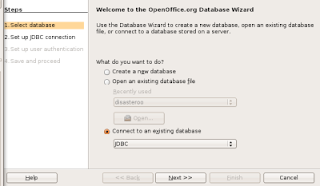


In the 'Set up a connection to a JDBC database' screen I entered

Datasource URL: jdbc:derby:/path/to/Sample
JDBC driver class: org.apache.derby.jdbc.EmbeddedDriver

Clicking on 'Test Class' confirmed the driver was in the Classpath as set earlier. The next screen is 'Set up the user authentication' I leave the 'User name' blank, but check the box labeled 'Password required'

On the next screen, 'Decide how to proceed after saving the database', click 'Yes, register the database for me' which allows OpenOffice.org to access the database (or you just have an odb file that includes database connection parameters) and 'Open the database for editing' ('Create tables using the table wizard' is not useful now since there already are datatables).

OpenOffice.org then asks for a name for the .odb file it will create to maintain the connection to the database (as well as any queries created in OpenOffice.org). The database can be accessed by clicking on any icon ('Tables', 'Queries', 'Forms', 'Reports'). OpenOffice.org will then connect to the database (asking for the database username and password along the way. Entering 'testuser' for username and 'test' for password does it). Then the database can be used from the GUI, which includes a graphical Query Design view or the usual SQL.

Thursday, May 01, 2008

Eclipse on the Hardy Heron (Ubuntu)

I took a bit of time with all the unpacking to getting my laptop up and running again. It seemed that the swap partition died, so I reinstalled everything. Well, at least I reinstalled Ubuntu, reinstalling Windows looks difficult. The first thing that I did after I reinstalled Ubuntu was run the Update Manager, which gave the option of upgrading to Ubuntu 8.04 (Hardy Heron). Well, if it is that easy, go for it. So I now have Hardy Heron on my laptop.

So for the past week, I've been upgrading packages, and figuring out what I need to get my system up. Most of it is pretty easy, just use the Ubuntu Synaptic Package manager and a few judicious searches get everything. And I got a few extras like Picasa and Google Earth. Evolution is now setup to use my Gmail and Google Calendar accounts. So almost all is good.

The big hiccup was getting Eclipse running. It was in the Ubuntu repositories, so I tried to load it from there. Problem, Ubuntu had Eclipse 3.2. The current version is 3.3, with 3.4 on the way. And the jump from 3.2 to 3.3 was big enough that some major applications that run in Eclipse require it. So I had to remove Eclipse 3.2 using the package manager, and install Eclipse from the website, just like I do with Windows. Annoying.

So, what do I have on Eclipse. Pydev is a must, as Python is my standard development language. Texlipse for LaTeX. Subclipse to use Subversion for source code. And StatET, for using with R (I've never used StatET before). And there are a couple other gotchas when installing Eclipse (like the need to have a directory $HOME/.mozilla/eclipse existing) that I would not have been able to figure out without some judicious web surfing). But just about everything is there now. I may not bother installing the Windows, but I may as well.

Sunday, January 27, 2008

Eclipse and 'TODO'

I can be so easily impressed sometimes. I was working on a model, and basically looking over some stuff I had put together in a couple of days to incorporate some feedback before a presentation. So it is a bit rough. And it is a bit late, so what I'm really doing is putting in a bunch of comments about what some of the code actually does and some things that I should do after I get some more sleep into me. And as I go along, I suddenly noticed that my screen was changing, other then just the fact that I was typing in code.

There was this little box to the left of the code.


So I was trying to figure out what was going on, because then I noticed I had a couple of these along with my debugging breakpoints. Then I figured it out. Among my many notes-to-self, I had put in some comments # TODO. And Eclipse was catching this and automatically building a task list for me.

Just a random note on the day. :-)

Wednesday, November 07, 2007

Computer development platform Part 2

Last month I started working on a model development aspect of a project. And I figured I'd take the time to learn the use of a new toolkit for programming. An update.

I had a project meeting yesterday that went very well. The approach was sound. The work on the model that I've done already has uncovered issues that have not been addressed by prior work, and this is going to lead to major policy recommendations. All the things that a model developer hopes will happen.

In addition, discussion uncovered some details in the system being modeled that I did not realize (helps when multiple heads get together to tease details out). And we are talking deployment when all is said and done. So, I have a few issues:
  1. The business logic of the model needs to be modified to handle my improved understanding of the process.
  2. A number of additional scenarios need to be considered, preferably without breaking anything else.
  3. The whole thing needs to be deployable. And that usually means MS Excel, a Visual Basic application, or Java (because these are things that can be sent to any computer without much trouble)
Number 3 leads to an additional complication. I've been developing the whole thing in Python, using Eclipse. I'm going to decide that for deployment, I will convert the whole thing to Jython, since that makes it deployable on a Java Virtual Machine (and everyone has Java installed). But Python is at version 2.5, while Jython is at version 2.2, so it is a couple years behind.

Well, this whole thing just screams out, unit testing. As it turns out, I've separated the building block objects from the business logic portions and the database access, which makes the whole thing easier. So, I build my test suite in PyUnit that takes the specifications and builds the model. Then the fun starts.
  1. I was still working on the business logic that allocates resources. It was messy, but it did provide output. So I wrote test cases that tested discrete stages along the way and rewrote the logic into smaller functions.
  2. Converting to Jython broke some functions, because newer versions of Python had some features that were not in Jython (some forms of introspection). So, I had to rewrite these so they worked under the older language specification, without breaking my test cases.
  3. Next on the list, write test cases that implement some of the newly described scenarios, and make them work.
Some of this involved serious work. In particular, rewriting the code to version 2.2 vs. 2.5. Right before I did this, I did a commit to version control (Subversion) just in case I completely messed up. The IDE also helps alot since it takes care of version control, checking Python and Jython, and running the unit tests.

A very productive day. I almost think that I'm getting the hang of this programming stuff.

Wednesday, October 03, 2007

Computer development platform

Well, I've started modeling work on a project at work. So far it has been data gathering planning (what kind of data do we need) and asking lots of questions about the system I'm trying to model. And, while that is not over, now that I'm back in Pittsburgh, time to get started. Right now, I'm actually doing the "make the first one to throw away" thing. Because this is so amorphous, I'm not sure just how to solve this just yet anyway. I told the project manager this, and he actually likes the idea as a risk management principle. (because version 2 is supposed to be deployable, let's just forget about that until I have a model that works, then worry about making it deployable)

Now, a lot of this is the fact that I'm working in a domain that not too many modelers have gone in. Slides that I've built for presentations in the past have gotten real good reception, as people who have seen this get the idea, and the possible impact. Of course now I have to deliver.

Since I get to work on that most idealized of environments, clean slate and zero previous work to build on, I thought I would actually try to do things right. And take the opportunity to build up a new tool chest. For now, documentation is in LaTeX, with Dia to build up flow charts and UMLish diagrams. I'm reading Head First Design Patterns by Freeman and Freeman, and some ideas have gotten in my head.

For the model building, there is an idea in the back of my head that deployment will be inside MS Excel and Visual Basic (because everything quantitative is deployed inside MS Excel and Visual Basic). But because the tools are just hard to develop in, and it quickly turns unmanageable, even when done right, I'll probably use Python and/or R to develop the initial model. One big benefit is the various algorithm libraries that are readily available in Python and R as well as the automatic documentation tools like Docstrings, PyUnit and Sweave. And I've actually used all of them.

For the tool chain, LaTeX and Dia and Python. But, since I had to get a new laptop anyway, and needed to reinstall my tools, why not try something new. I'm doing almost everything inside of the Eclipse IDE, specifically the EasyEclipse version of it. In addition to Java development (which I may end up doing non of, unless I switch into Jython), it handles LaTeX (through TeXlipse), Python, through Pydev), database access, and version control through Subversion. First time I've used many of these tools before. It is rather nice. TeXlipse is much better then the JEdit or Vim that I've used in the past since it does command completion, and it seems even better then TeXnicCenter that I did my thesis in. Having version control as an integral part of the IDE is wonderful. I've tried it in the past and it just got too bulky, even with a graphic interface. Now it is just a button click. Auto-build in Eclipse is nice too. Having a window with the results updated with every save means near-realtime feedback. Since Dia saves diagrams as XML, that works in a version control system also. So all my notes, the documentation, diagrams and the source code will all be in version control. I almost feel like I know what I am doing with this development thing.

Of course, the real fun starts next. Going from all my diagrams to actual code and data.